BP-Judger network configuration
BP-Judger network configuration
Motivation
Because gRPC needs to issue network calls.
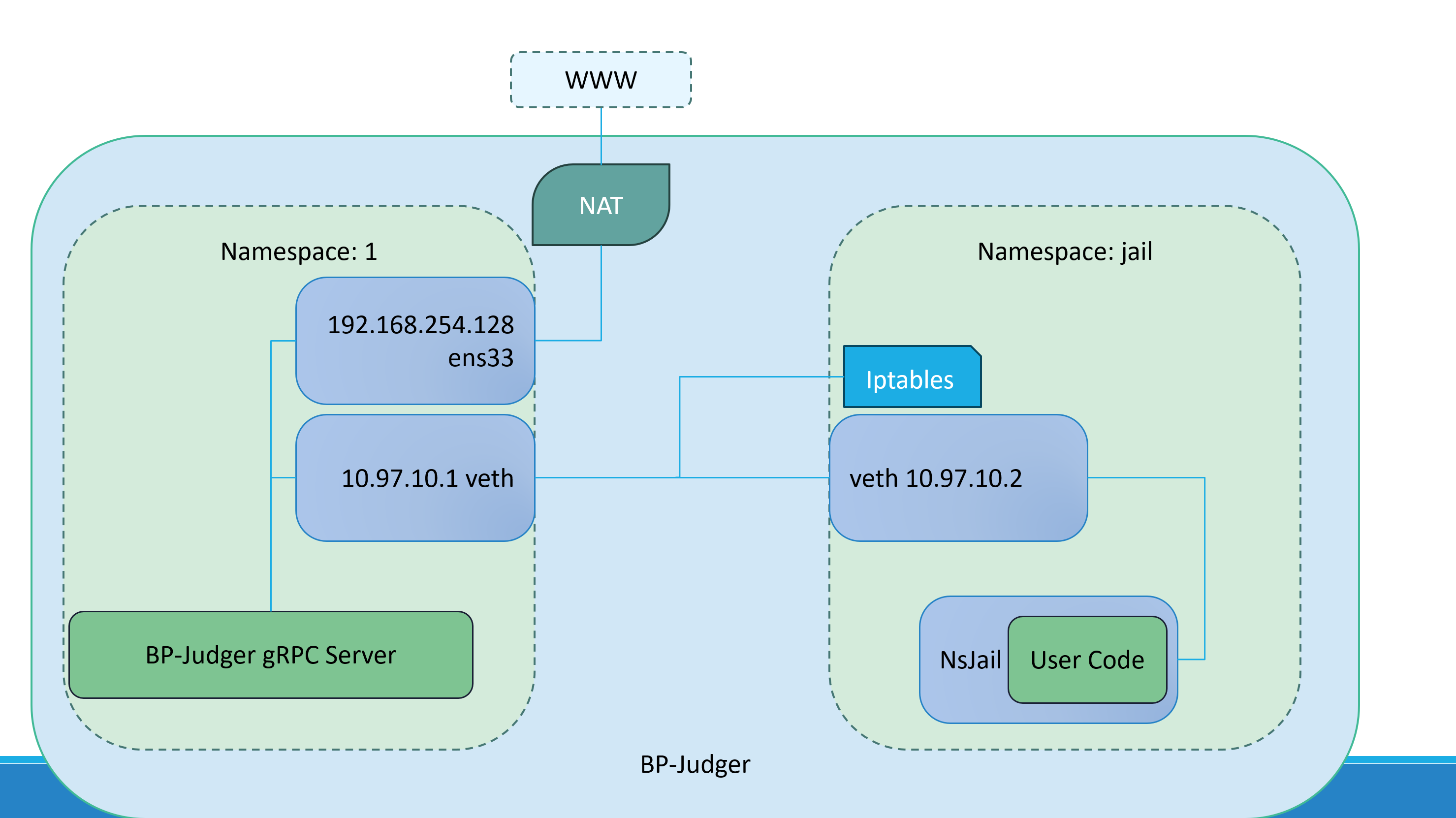
BP-Judger (called BP below) and the user program in nsjail (called jail below) need network communication, but the bot must not access any network resources other than the BP-Judger gRPC Server. This requires isolation in network configuration.
What
Use Linux netns for network namespace isolation.
Use a veth pair to connect the bot namespace jail_ns with the namespace where BP lives (could be another namespace or the main network namespace).
How
TIP
It is recommended to use this Perl script for quick deployment.
Then jump directly to configuring iptables rules.
DANGER
The following content is not verified and may contain errors!
Hint: You may need sudo to execute the following commands.
#!/bin/bash
# 创建 jail_ns 命名空间
ip netns add jail_ns
# 创建 veth pair (veth pair总是成对出现)
ip link add veth-jail type veth peer name veth-host

# 运行ip a你可以查看创建的 veth pair
# ip a
# 如果正确,你会看见两个veth设备

# 将 veth pair 的一端(veth-jail)放入 jail_ns 命名空间
ip link set veth-jail netns jail_ns
# 为两个 veth 接口配置 IP (可以自行更改)
ip netns exec jail_ns ip addr add 10.0.0.1/24 dev veth-jail
ip addr add 10.0.0.2/24 dev veth-host
# 启用两个 veth 接口
ip netns exec jail_ns ip link set veth-jail up
ip link set veth-host up

# 在 host net namespace 设置  ens33 为 veth-host 通过 NAT 转发数据包 (可选的,bp-judger不需要这个)
# (从外部看,veth-host 出站的数据包就像是从 ens33 出站的数据包)
# !!请把 ens33 换成你的对应环境里面的设备
# iptables -A FORWARD -i veth-host -o ens33 -j ACCEPT
# iptables -A FORWARD -i ens33 -o veth-host -j ACCEPT
# iptables -t nat -A POSTROUTING -s 10.0.0.0/24 -o ens33 -j MASQUERADE
# 注意:上面三个设置iptables是可选的

# @@@ 设置 jail_ns 的 iptables,只放行对特定端口的连接 @@@
# 进入 jail_ns
ip netns exec jail /bin/bash
# 设置 OUTPUT chain 的默认行为为 DROP
iptables -P OUTPUT DROP
# 设置只允许对特定模板特定端口的连接
# 这里的目标是10.0.0.1, 即 veth-host,且流量通过 NAT 转发到 ens33 (即 host)
iptables -A INPUT -p tcp -d 10.0.0.1 --dport 3000 -j ACCEPT
# 如果需要更多请重复上一步

# 查看 iptables
iptables -L --line-numbers
# 如果一切正常,你应该看到
: '
    Chain INPUT (policy ACCEPT)
    num  target     prot opt source               destination

    Chain FORWARD (policy ACCEPT)
    num  target     prot opt source               destination

    Chain OUTPUT (policy DROP)
    num  target     prot opt source               destination
    1    ACCEPT     tcp  --  anywhere             10.0.0.2             tcp dpt:3000
'
Test it out
# 在 veth-host 启动测试服务
echo "Hello from veth-host" | nc -l -p 3000
Open another terminal
# 在 veth-jail 环境内测试
# 进入 veth-jail 命名空间
ip netns exec veth-jail /bin/bash

# 在 veth-jail 中的 Shell 中,尝试连接到 veth-host 上的 Echo 服务器
echo "Hello from veth-jail" | nc veth-host-ip 3000
If everything is configured correctly, you should see Hello from veth-jail and Hello from veth-host on each side.
TIP
This assumes your firewall has no rules set.
You may need this (not used here):
# 在宿主(host) net namespace 临时启用 ip_forward
### 注意 ###
# 临时启用:下次重启系统时,并不会保留这个设置
# echo 1 > /proc/sys/net/ipv4/ip_forward
If setup is hard, use tcpdump to inspect.
# tcpdump -i <iface_name>